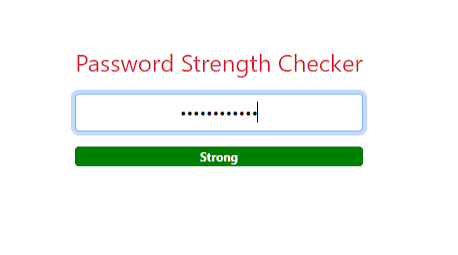
Password Strength Checker
Created on 17 September, 2025 • Checker tools • 196 views • 5 minutes read
A Complete Guide to Secure Your Online Accounts
Password Strength Checker: How to Ensure Your Online Security
What Is a Password Strength Checker?
A Password Strength Checker is an online tool that evaluates the security level of your passwords. In today’s digital age, where accounts, personal data, and sensitive information are constantly at risk, using strong passwords is critical.
The tool analyzes your password based on multiple factors such as length, complexity, use of numbers, symbols, and uppercase letters. It then provides a rating or score that indicates how resistant your password is to being hacked.
Password Strength Checkers are essential for individuals, businesses, and developers who want to enhance security across accounts, applications, and websites. They help identify weak passwords, suggest improvements, and reduce the risk of data breaches.
Why Password Strength Checkers Are Important
Strong passwords are the first line of defense against unauthorized access. A Password Strength Checker is important for several reasons:
1. Protect Against Hacking
Cybercriminals use automated tools to crack weak passwords. Simple or common passwords are highly vulnerable. A Password Strength Checker ensures your passwords are robust enough to resist hacking attempts.
2. Prevent Account Takeovers
Weak passwords can allow attackers to gain control of email, social media, or financial accounts. Checking your password’s strength helps prevent unauthorized access and potential identity theft.
3. Promote Better Security Practices
Many users reuse passwords or choose easy-to-remember sequences, which are often weak. Password Strength Checkers educate users about strong password creation and encourage safer online habits.
4. Compliance with Security Standards
Organizations often require passwords to meet specific security standards, such as minimum length, use of numbers, and special characters. A Password Strength Checker ensures that passwords comply with these requirements.
5. Protect Sensitive Information
Strong passwords safeguard sensitive data such as personal information, financial records, and business information. Using a Password Strength Checker ensures that your digital assets remain secure.
What Factors Determine Password Strength?
A Password Strength Checker evaluates multiple aspects of a password to determine its robustness:
- Length: Longer passwords are generally harder to crack.
- Complexity: A mix of uppercase and lowercase letters increases strength.
- Numbers: Including numbers adds a layer of unpredictability.
- Symbols: Special characters such as !, @, #, and $ make passwords more secure.
- Avoiding Common Patterns: Passwords should avoid predictable sequences like “123456” or “password.”
- Uniqueness: Unique passwords for different accounts prevent one breach from compromising multiple accounts.
By analyzing these factors, the tool provides actionable feedback and often recommends ways to improve weak passwords.
How a Password Strength Checker Works
A Password Strength Checker works by analyzing the characteristics of a password against known security standards. The process typically involves:
- Input Evaluation: The user enters a password into the checker.
- Complexity Analysis: The tool evaluates the password for length, character diversity, and uniqueness.
- Pattern Recognition: Common patterns, dictionary words, or easily guessable sequences are flagged.
- Scoring: The password receives a strength score, usually ranging from weak to very strong.
- Recommendations: The tool provides suggestions to make the password stronger, such as adding symbols, numbers, or increasing length.
This evaluation helps users create stronger passwords that are less vulnerable to hacking.
Practical Uses of a Password Strength Checker
1. Personal Account Security
Individuals can use a Password Strength Checker to evaluate the security of personal accounts such as email, social media, and banking. It helps ensure that their accounts are protected from unauthorized access.
2. Business and Enterprise Security
Organizations often manage hundreds or thousands of user accounts. Using a Password Strength Checker helps enforce strong password policies across employees, contractors, and clients.
3. Website and Application Development
Developers can integrate password strength checks during account registration or password reset processes. This ensures that users create secure passwords from the outset.
4. Educational Purposes
Password Strength Checkers are also useful for educating users about password security. By showing weaknesses and providing suggestions, users learn how to create stronger passwords for all their accounts.
5. Profile and Portfolio Security
For platforms like ProfileLinks.xyz, ensuring that users choose strong passwords is vital for protecting digital portfolios, personal information, and linked accounts from unauthorized access.
Common Limitations of Password Strength Checkers
While these tools are highly valuable, there are some limitations to be aware of:
- Not Foolproof: Even strong passwords can be compromised through phishing or social engineering attacks.
- Local Evaluation Only: Some checkers do not store or transmit passwords, which is safer but may limit cross-checking against breached password databases.
- User Behavior: Users may still reuse passwords across multiple accounts despite checker recommendations.
- Context-Specific Security: Password strength does not account for additional security measures like two-factor authentication, which can further enhance protection.
Understanding these limitations helps users combine password strength checking with other security practices for maximum protection.
Best Practices for Strong Passwords
To complement a Password Strength Checker, users should follow these best practices:
- Use Long Passwords: Aim for 12–16 characters or more.
- Mix Character Types: Include uppercase, lowercase, numbers, and symbols.
- Avoid Predictable Patterns: Do not use easily guessable sequences like birthdays or repeated numbers.
- Unique Passwords: Use different passwords for each account.
- Regular Updates: Change passwords periodically, especially for sensitive accounts.
- Enable Two-Factor Authentication: Combine strong passwords with additional verification for enhanced security.
These practices, combined with a Password Strength Checker, significantly reduce the risk of unauthorized access.
The Future of Password Security
As cyber threats continue to evolve, password security remains a critical aspect of digital safety. Future developments may include:
- Advanced AI Analysis: Tools will use artificial intelligence to detect vulnerabilities and suggest stronger passwords in real time.
- Integration with Authentication Systems: Password checkers may work alongside multi-factor authentication, biometric verification, and password managers.
- Real-Time Breach Alerts: Users will be notified immediately if their passwords appear in known data breaches.
- User Education and Training: Password checkers will increasingly educate users about evolving security threats and best practices.
These advancements aim to create a safer digital environment and improve user awareness of password security.
Conclusion
A Password Strength Checker is an essential tool for anyone using digital accounts, websites, or online services. It helps identify weak passwords, provides actionable suggestions for improvement, and promotes safer online habits.
For portfolio and profile sites like ProfileLinks.xyz, ensuring that passwords are strong is crucial for protecting digital portfolios, personal data, and linked accounts from unauthorized access.
Regularly using a Password Strength Checker, combined with best practices such as unique, complex passwords and multi-factor authentication, is one of the most effective ways to secure your online presence in today’s digital world.
Popular posts
-
How Robotics Will Transform FactoriesTech Blog • 419 views
-
Future Smartphones: What’s Coming NextTech Blog • 417 views
-
How AI Is Transforming Business in 2025Tech Blog • 397 views
-
Future of Online SecurityTech Blog • 383 views
-
How Data Privacy Is EvolvingTech Blog • 369 views