Exif reader
Created on 17 November, 2025 • Misc tools • 267 views • 7 minutes read
Explore how an EXIF Reader reveals hidden image metadata including camera settings, timestamps, GPS data, and editing information to help you manage and protect your photos.
EXIF Reader
Understanding the Purpose of an EXIF Reader
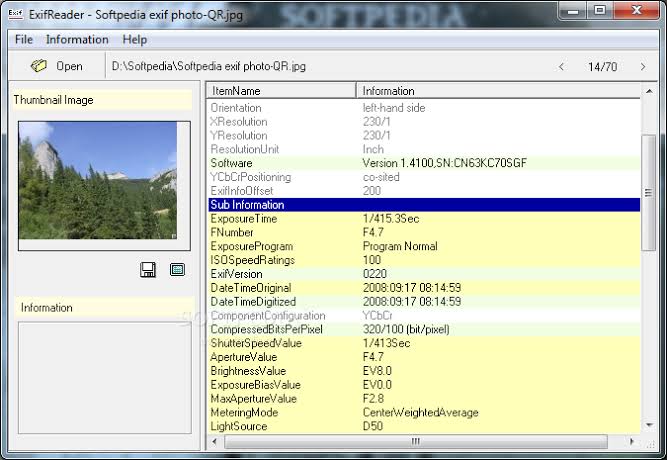
An EXIF reader is a tool that allows you to examine the technical information stored inside digital images, something most people never see even though it exists in almost every photo captured by a modern camera or smartphone. When you take a picture, the device quietly records details about the settings used, the environment, and sometimes the exact location. These details are known as EXIF data, short for Exchangeable Image File Format. They live inside the image file and travel with it wherever it goes, whether uploaded to a website, shared on social media, or stored in a gallery. An EXIF reader opens this hidden layer and reveals everything in a readable and organized way, helping you understand what is happening behind the scenes of a simple photo.
The information stored in EXIF data often includes the date and time the photo was captured, camera model, software used for editing, shutter speed, aperture, ISO level, focal length, flash information, resolution, color profile, and GPS coordinates if location services were enabled. Without an EXIF reader, this information remains invisible. With one, the invisible becomes clear and usable. This makes the tool highly valuable not only for photographers but also for content creators, digital analysts, designers, security-conscious users, and anyone who manages images professionally or casually. Understanding the purpose of an EXIF reader helps you appreciate how powerful metadata can be when used correctly.
Why EXIF Data Plays an Important Role in Digital Photography
The importance of EXIF data grows each year as digital photography continues to dominate both professional and personal spaces. Many people take photos daily, but very few realize how much information a single picture contains. EXIF data acts like a silent logbook that records how the image was created. For a photographer, it becomes a learning tool because it shows exactly which settings produced a successful shot and which settings led to problems such as noise, blur, or incorrect exposure. This information makes experimentation easier since you can compare metadata from different pictures and refine your shooting technique based on real data rather than guesswork.
For digital creators, EXIF matters in a different way. Most websites require specific resolutions and color profiles to ensure proper display quality. When preparing images for blogs or e-commerce platforms, checking metadata helps confirm whether a file meets the required standards. It also indicates whether the image has passed through certain editing software, which may add or modify metadata fields. This becomes relevant when consistency and file hygiene matter, such as building a brand catalog, preparing a product listing, or organizing image archives.
The Relationship Between Metadata and Photo Authenticity
Metadata also plays a role in confirming whether an image is trustworthy. Although EXIF data can be manipulated, many indicators in the metadata help identify inconsistencies. For example, if a photo claims to be taken recently but the timestamp in the EXIF says otherwise, this immediately raises questions. If the metadata shows that editing software was used when a photo is claimed to be unedited, this is another red flag. Many investigators, journalists, and researchers use EXIF readers as a first step in verifying digital media. While the presence of metadata does not guarantee authenticity, the absence or alteration of certain fields may suggest that a deeper analysis is needed.
How an EXIF Reader Works in Practice
The working process of an EXIF reader is straightforward. You upload a photo, and the system extracts metadata embedded inside it. The device that captured the image originally generated this metadata automatically based on settings and environmental conditions. As long as the file format supports EXIF data, the tool will reveal it. JPEG and TIFF files typically hold extensive EXIF data, whereas formats like PNG and GIF usually do not support it. Some smartphones save plenty of metadata, including device identifiers and exact location, while others save minimal information based on privacy preferences.
One interesting point is that many social networks strip EXIF data from photos to protect user privacy. For example, an image uploaded to a messaging platform may lose its metadata. If you use an EXIF reader on such an image, you might see very limited information. This does not mean the photo never had metadata; it simply means the platform removed it. To get accurate details, use original files from your device's camera roll or storage.
Examining Camera Settings Through EXIF
Camera metadata reveals how the photographer approached the shot. When you view shutter speed, aperture, and ISO together, you can understand whether the lighting was bright or dim, whether fast movement was involved, or whether the photographer was aiming for shallow depth of field. These three settings form the exposure triangle, which is the foundation of digital photography. Seeing them in the metadata can help reconstruct the creative choices behind the image. If a photo is blurry, the EXIF might reveal a slow shutter speed. If a photo is too grainy, the EXIF may show a high ISO. If an image looks flat or incorrectly exposed, aperture details may explain why. An EXIF reader gives you the data needed to evaluate your technique realistically rather than rely on memory or assumptions.
Understanding GPS Data and Privacy Risks
GPS data embedded in an image can reveal the exact coordinates of the place where the photo was taken. While this is convenient for organizing travel photos, it can also be a significant privacy risk. A single unedited image shared online could unintentionally disclose home addresses, workplaces, or frequently visited locations. Many people are unaware that this information exists inside their photos. Using an EXIF reader helps you check whether GPS coordinates are present, allowing you to decide whether you want to remove them before posting the image publicly.
Why an EXIF Reader Matters for Security
In a world where digital sharing happens constantly, understanding what information your images carry helps protect you from accidental exposure. Even if you never intended to share personal data, metadata can reveal more than expected. Checking EXIF data before uploading images to websites, forums, or social media platforms is a simple step that reduces risks. Businesses also use EXIF readers to ensure that customer-facing images contain no sensitive metadata. For example, real estate agencies remove GPS coordinates from property photos so clients do not know precisely where the photographer stood. Social media managers examine metadata to confirm no personal device identifiers remain in uploaded media.
The Value of an EXIF Reader for Creative Professionals
Creative professionals often handle hundreds or thousands of images in a single project. Having access to metadata allows them to organize their files more efficiently. It also helps maintain consistency across a series of photos. For example, a designer preparing a brand catalog may want all images to use the same focal length, color profile, or exposure settings. By comparing metadata, they ensure visual consistency without relying solely on the appearance of the images. An EXIF reader becomes a subtle but essential part of quality control.
Photographers also rely on metadata for learning. By examining EXIF data across various lighting conditions, camera lenses, and subjects, they can understand patterns that improve their work. Metadata becomes a form of teaching material, showing the relationship between settings and results. Instead of guessing which aperture produced a beautifully blurred background or which ISO captured a clear night scene, the EXIF reader provides precise answers.
How EXIF Data Affects File Conversion and Editing
When images are edited or converted, metadata may change depending on the software used. Some tools preserve EXIF data exactly as it is, while others modify or delete certain fields. This can affect how future viewers interpret the image. For example, converting a RAW file to JPEG often reduces the amount of metadata. Editing software may also add its own signatures or version numbers to the EXIF data. An EXIF reader allows you to monitor these changes and understand how your workflow affects the integrity of the image file.
Final Thoughts on Using an EXIF Reader
An EXIF reader is a simple yet powerful tool for uncovering the technical memory behind every digital photo. Whether you are analyzing camera settings, protecting personal privacy, checking authenticity, improving your photography, or preparing images for the web, understanding metadata gives you more control over your digital content. Every image carries a hidden layer of information, and this tool opens that layer in a clear and meaningful way. With greater awareness of what your photos contain, you can make smarter decisions about how you capture, edit, and share them. An EXIF reader supports both creativity and security, making it an essential part of modern digital media management.
Popular posts
-
How Robotics Will Transform FactoriesTech Blog • 508 views
-
Future Smartphones: What’s Coming NextTech Blog • 492 views
-
How AI Is Transforming Business in 2025Tech Blog • 480 views
-
Future of Online SecurityTech Blog • 453 views
-
Best Coding Languages for 2025Tech Blog • 449 views