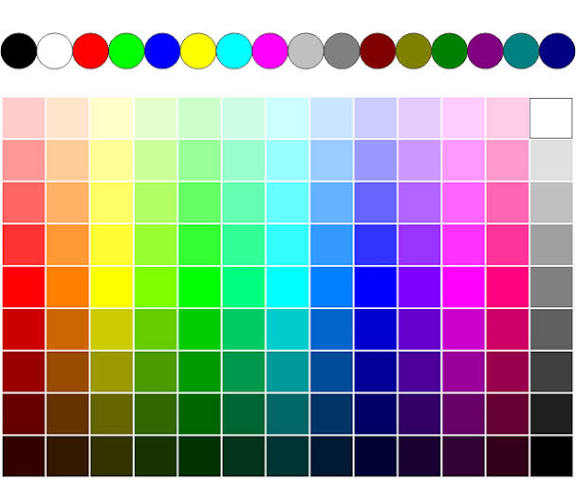
Color picker
Created on 18 November, 2025 • Misc tools • 223 views • 7 minutes read
A color picker tool helps designers and creators identify, refine, and apply precise digital colors across web design, branding, and creative projects. Learn how it works and why it matters.
Color Picker
Understanding the Purpose of a Color Picker Tool
A color picker is one of the simplest yet most essential tools used in digital design. It allows you to identify the exact color value from any part of an image, webpage, or design element and express that color in formats like HEX, RGB, HSL, or CMYK. Even though it seems like a basic utility, the color picker shapes every part of visual design, from brand identity and UI consistency to digital artwork and professional printing. Every pixel on a screen carries a unique combination of color data, and the color picker translates that data into something you can understand and reuse.
The tool serves as a bridge between what your eyes see and what your design software understands. Human perception often struggles to distinguish subtle variations in tone, but a color picker can pinpoint the exact numerical color representation with complete precision. This eliminates guesswork and ensures your visuals remain consistent across platforms. Whether you're developing a website, editing a photo, designing a logo, or refining a product mockup, you rely on accurate color translation. The color picker makes this reliability possible by giving you access to the underlying values that define digital color.
How Digital Colors Work Behind the Scenes
Every color displayed on a screen is the result of red, green, and blue light combining to form millions of shades. This RGB model controls almost everything we see on a digital device. When you select a color using a color picker, the tool interprets the exact red, green, and blue levels required to produce that shade. Designers often use the HEX format, a simplified representation of RGB values that is widely used in web design. HSL, another common format, expresses color in terms of hue, saturation, and lightness, which feels more natural for artists and illustrators.
Understanding how these formats relate to each other helps you appreciate the role of a color picker. Many designers see a color they like—maybe in an image, branding element, or user interface—but without a tool, they cannot reproduce it. The color picker analyzes the pixel, decodes its RGB signature, and provides accurate numerical values. This ensures the color can be replicated anywhere, even in a different software environment. This level of accuracy is essential for branding, because even slight variations can dilute a brand’s visual consistency.
Why a Color Picker Matters for Branding and Design Consistency
A brand identity relies heavily on repeating the same colors in every medium. A slight difference between two shades of blue may not seem significant at first, but when placed side by side, inconsistent tones weaken the visual personality of a brand. A color picker solves this problem by giving designers the ability to lock into a precise shade and apply it across all materials. From logos and website headers to product packaging and advertising content, consistency builds recognition, and recognition builds trust.
Designers also use color pickers when creating themes, palettes, and UI systems. When developing a website interface, colors must adapt across different devices, resolutions, and lighting conditions. With accurate HEX and RGB values, the chosen palette remains stable regardless of the display environment. A reliable color picker provides both the exact shade and alternative color formats, ensuring compatibility with different tools, frameworks, or printing systems.
Exploring the Role of Color Pickers in Creative Workflows
In creative workflows, the color picker becomes a daily companion. Photographers rely on it to match tones across edited photos, ensuring their visual style remains unified. Illustrators use it to build harmonious palettes, especially when working with multiple layers, shading, or digital painting tools. Video editors depend on accurate color selection to maintain consistent grading across footage. Even UI designers adjusting hover states or backgrounds depend on the precision provided by a color picker.
There is a specific kind of satisfaction in capturing a color from a reference image—perhaps the tone of a sunset sky, the shade of a product, or the exact color of an object in a photo—and converting it into a stable value you can reuse. This translation from real-world color to digital code allows artists and designers to recreate emotion, atmosphere, and meaning within their work. The color picker is the tool that makes this transition seamless.
Matching Colors Across Platforms
One of the hidden challenges of digital design is that colors often appear differently depending on the screen or platform displaying them. Professional monitors may show deeper tones, mobile screens may show boosted brightness, and older displays may shift hues unintentionally. While no tool can completely eliminate these differences, a color picker ensures the designer is at least working from accurate values.
When testing a website or app across different devices, a color picker helps you confirm that the colors are still consistent with the intended palette. If something looks off, you can compare the actual on-screen value with the original color data to determine whether the discrepancy is due to display variation or a design error. This level of verification is crucial in professional environments where design accuracy matters.
How Color Pickers Influence Web Development and UI Design
Color pickers play a major role in web development. When styling elements with CSS, developers rely on specific HEX or RGB values to maintain consistent color usage across pages. Even slight deviations—such as using #0055FF instead of #0056FF—can break visual harmony. A color picker minimizes the possibility of such inconsistencies by allowing developers to extract colors directly from design assets rather than manually approximate them.
In UI design, color plays a functional role beyond aesthetics. Certain shades must meet accessibility standards for contrast, ensuring text is readable for all users. A good color picker helps verify contrast ratios by allowing designers to compare foreground and background shades. This ensures your site or app remains accessible while also maintaining visual appeal. Consistent and accurate colors directly influence the usability of digital products.
Understanding the Emotional Impact of Color Choices
Color theory is deeply connected to psychology. Every color carries emotional meaning and influences how users perceive content, branding, or user interfaces. While the emotional aspect is subjective, color pickers help maintain harmony and coherence across mood-driven palettes. When a designer builds an emotional experience—whether calming, energetic, modern, or nostalgic—they rely on specific shades that create the desired feeling.
For example, warm tones evoke comfort or attention, while cooler tones suggest stability or calmness. Pastel colors often express softness, while high-contrast palettes signal modern energy. A color picker enables designers to explore these emotional relationships by studying subtle variations in shade and adjusting them until the palette communicates the intended message. Without this precision, the emotional impact would be inconsistent and less effective.
Color Pickers in Image Editing and Photography
For photographers and image editors, a color picker is essential in correcting tones, matching colors, and achieving consistent skin tones or environmental hues. When editing photos, colors often shift due to lighting, lens effects, or white balance problems. A color picker helps you isolate problem areas and adjust them accurately. It can also help match the colors of different photos in a series, such as portrait sessions, product photography, or travel collections.
Editors also use color pickers to study color relationships within an image. By sampling shadows, highlights, and midtones, they can understand the color profile of a photograph and enhance it accordingly. This tool becomes especially helpful when applying selective color corrections or color grading styles that require precision.
How a Color Picker Supports Printing and Physical Design Work
Although digital screens use the RGB model, physical printing relies on CMYK. Many color pickers provide both RGB and CMYK values, helping designers avoid mismatches when moving a design from digital to print. Without this conversion, printed materials like brochures, posters, or packaging might not match the original colors seen on screen.
A color picker allows designers and printers to communicate more clearly. By using standardized color values, designs become predictable across machines, paper types, and print environments. This level of synchronization is essential for branding and product consistency.
The Importance of Precision in Modern Digital Workflows
The modern digital world demands precision. Whether you’re building a brand identity, editing a photo, designing a website, or creating marketing materials, every visual decision contributes to how the final product is perceived. A color picker is a foundational tool that supports this precision. It transforms colors from vague impressions into exact values, ensuring accuracy, professionalism, and consistency in every creative project.
Color pickers also empower non-designers. Bloggers, marketers, small business owners, and casual creators often need to match colors for their posts, thumbnails, social media banners, or product listings. Even without formal design experience, a color picker allows them to choose colors confidently and produce cohesive visuals.
Final Thoughts on the Role of a Color Picker
A color picker may appear simple, but it supports complex creative decisions. It ensures that colors remain consistent, meaningful, and accurately reproduced across digital environments. By helping designers translate visual impressions into precise data, it becomes an essential tool for modern digital work. Whether you are developing brand materials, editing visual content, adjusting a user interface, or building a personal project, the color picker allows you to work with confidence and clarity. With accurate color representation, your visuals become stronger, more professional, and aligned with the emotional tone you intend to create.
Popular posts
-
How Robotics Will Transform FactoriesTech Blog • 419 views
-
Future Smartphones: What’s Coming NextTech Blog • 417 views
-
How AI Is Transforming Business in 2025Tech Blog • 397 views
-
Future of Online SecurityTech Blog • 383 views
-
How Data Privacy Is EvolvingTech Blog • 369 views